Sales turns the conversations you already have into a managed pipeline. After this article you will know what each part of Sales does, where to find it and how to set it up for your team.
¶ How Sales fits with the rest of HueChat
Every person in Sales is the same customer you see in the Customer CDP. A lead, a deal or a quote is a process attached to that customer, never a second copy of them. The WhatsApp conversation, appointments, forms and sales history all stay on one profile.
¶ Where to find everything
In the left sidebar, open Sales:
- Overview: your pipeline, forecast, work queue, recent activity and data-quality signals.
- Leads: people you are still qualifying.
- Companies: the organizations you sell to.
- Deals: qualified opportunities moving through your pipeline.
- Quotes & Payments: versioned quotes and payment status.
- Tasks: your tasks, your team's queues and the shared calendar.
Under Features you find Products, Price Books and Sales Settings. Sales reports are in Reports → Sales, and CRM Automation opens from Customer CDP → Journeys.
The Deals item above Sales opens the classic deals board. Use Sales → Deals for the full workspace.
¶ Read the Sales overview
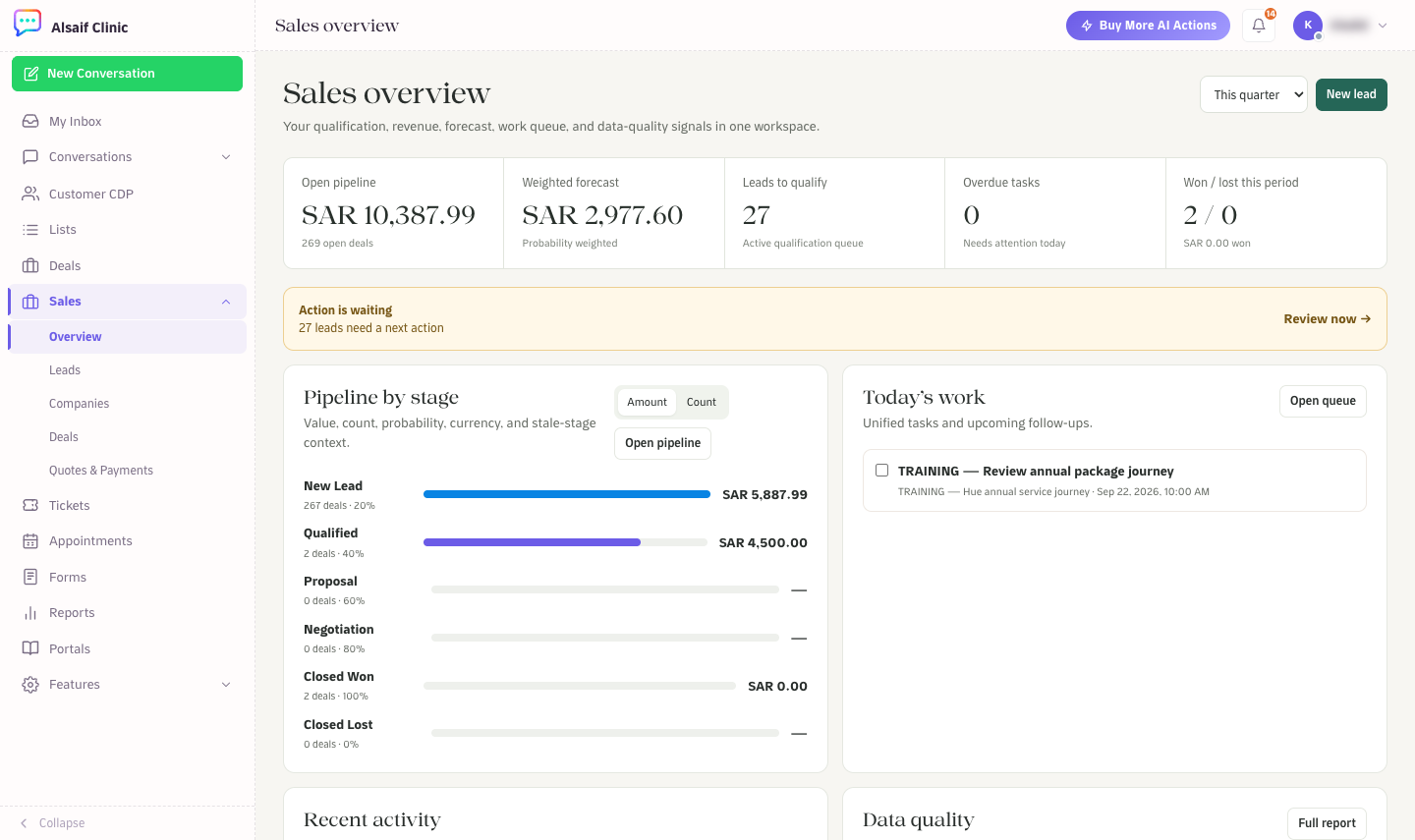
The Sales overview with pipeline, forecast, work queue and stage breakdown
- Choose the period at the top right: This quarter, This month, Last quarter or This year.
- The cards show Open pipeline, Weighted forecast, Leads to qualify, Overdue tasks and Won / lost this period. Click a card to open the matching list.
- Action is waiting appears when leads need a next action. Choose Review now.
- Pipeline by stage shows the value or number of deals per stage. Switch between Amount and Count.
- Today's work lists open tasks and follow-ups. Open queue opens Tasks & Calendar.
- Further down you find Recent activity, Data quality and the Conversion funnel.
¶ Set up Sales in four steps
- Choose how conversations enter Sales. An administrator opens Sales Settings → Conversation ingestion and picks Contacts only, Contact + Lead, Contact + Deal, or Contact + Lead, then Deal on qualification.
- Check your pipeline. In Sales Settings → Pipelines & stage rules, review the stages, their probabilities and the fields each stage requires.
- Decide who owns new records. In Automatic assignment, choose round robin or least busy, respect working hours and pick a fallback owner.
- Add your catalog (optional). Create products and a standard price book if you send quotes.
¶ Who can do what
- Administrators change Sales Settings, edit pipelines and approve discounts.
- Agents work leads, companies, deals, tasks and quotes day to day.
- Custom roles need the Deals permission to see Sales.
¶ Plans
Sales is available on plans that include it. Leads, Products & Quotes, CRM Automation, Reports and Forecasting are modules that your plan may or may not include. A module that is not included does not appear in the sidebar. If you expect a module and cannot see it, ask your account owner or email support@huechat.ai.