HueChat for Shopify sends your customers WhatsApp updates about their orders from your own WhatsApp Business number. This page explains what it does, how to install and set it up, and how customer permission works.
¶ What it does
HueChat connects your Shopify store to your WhatsApp Business number and sends a WhatsApp update for each of these events:
- Order confirmed: with the order number, items and total.
- Payment confirmed: when the order is fully paid.
- Shipment created: when items ship, with the tracking number.
- Shipment delivered: when Shopify marks the shipment delivered.
- Order cancelled: when the order is cancelled.
- Refund created: when a refund is issued, with the refund amount.
- Abandoned checkout: a reminder to a customer who left checkout, with a link back to it.
¶ Install
- Install HueChat from the Shopify App Store and approve the permissions Shopify shows.
- Sign in to HueChat or create an account, then choose the workspace to connect.
- Your store appears as connected in Settings → Integrations → Shopify.
¶ Quick setup
Quick setup opens by itself after you connect. You can run it again at any time with the Quick setup button on the Shopify page. It has four steps.
¶ Step 1: Sender and language
Choose the WhatsApp number that sends the updates, the Country for local phone numbers (HueChat uses it to read customers' local phone numbers) and the language of the messages.
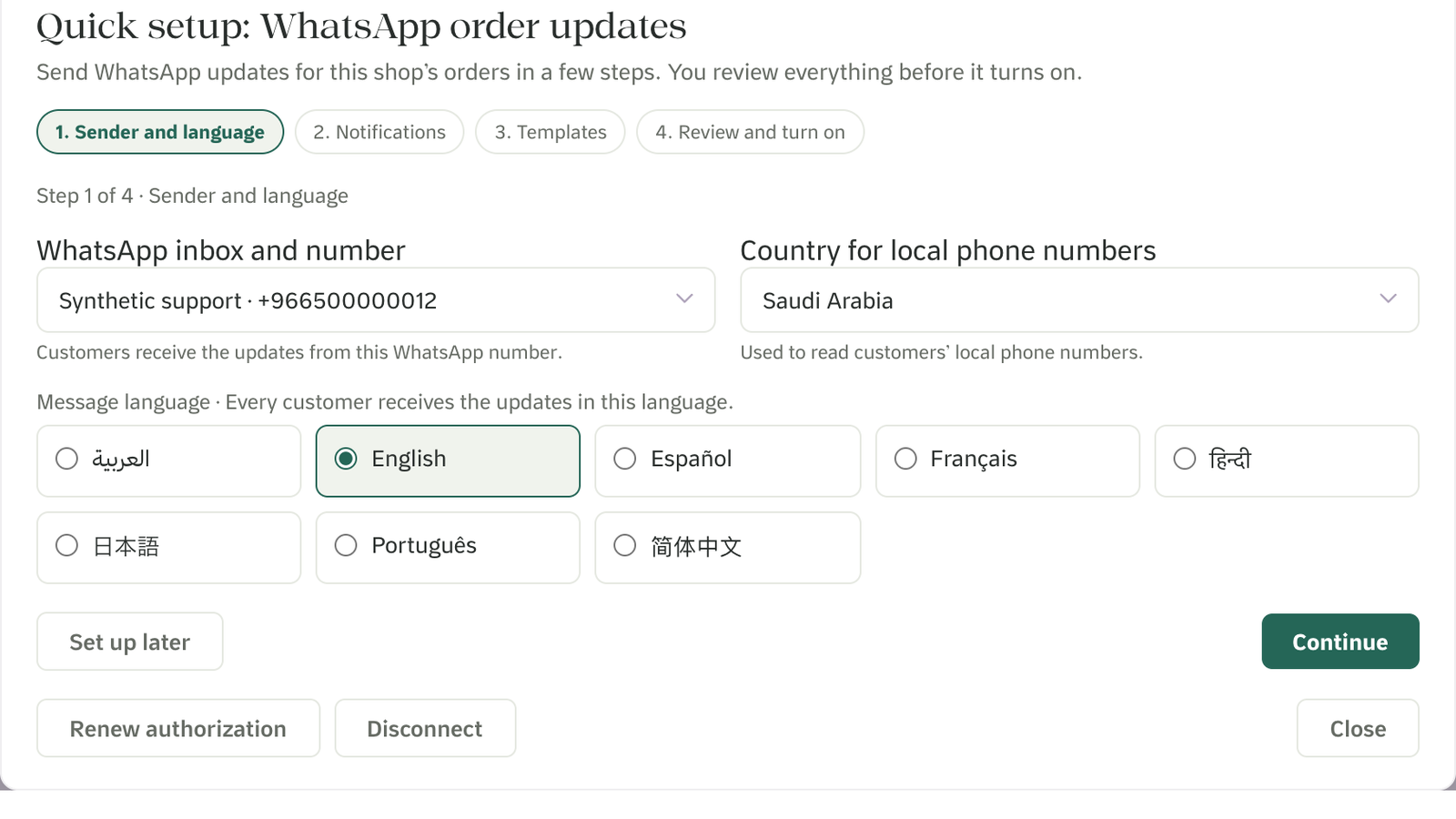
Quick setup step 1: the WhatsApp number, the country for local phone numbers and the message language
¶ Step 2: Notifications
Choose which updates customers receive. The six order updates are on by default. Abandoned checkout is optional. In this step you also confirm customer permission (see below).
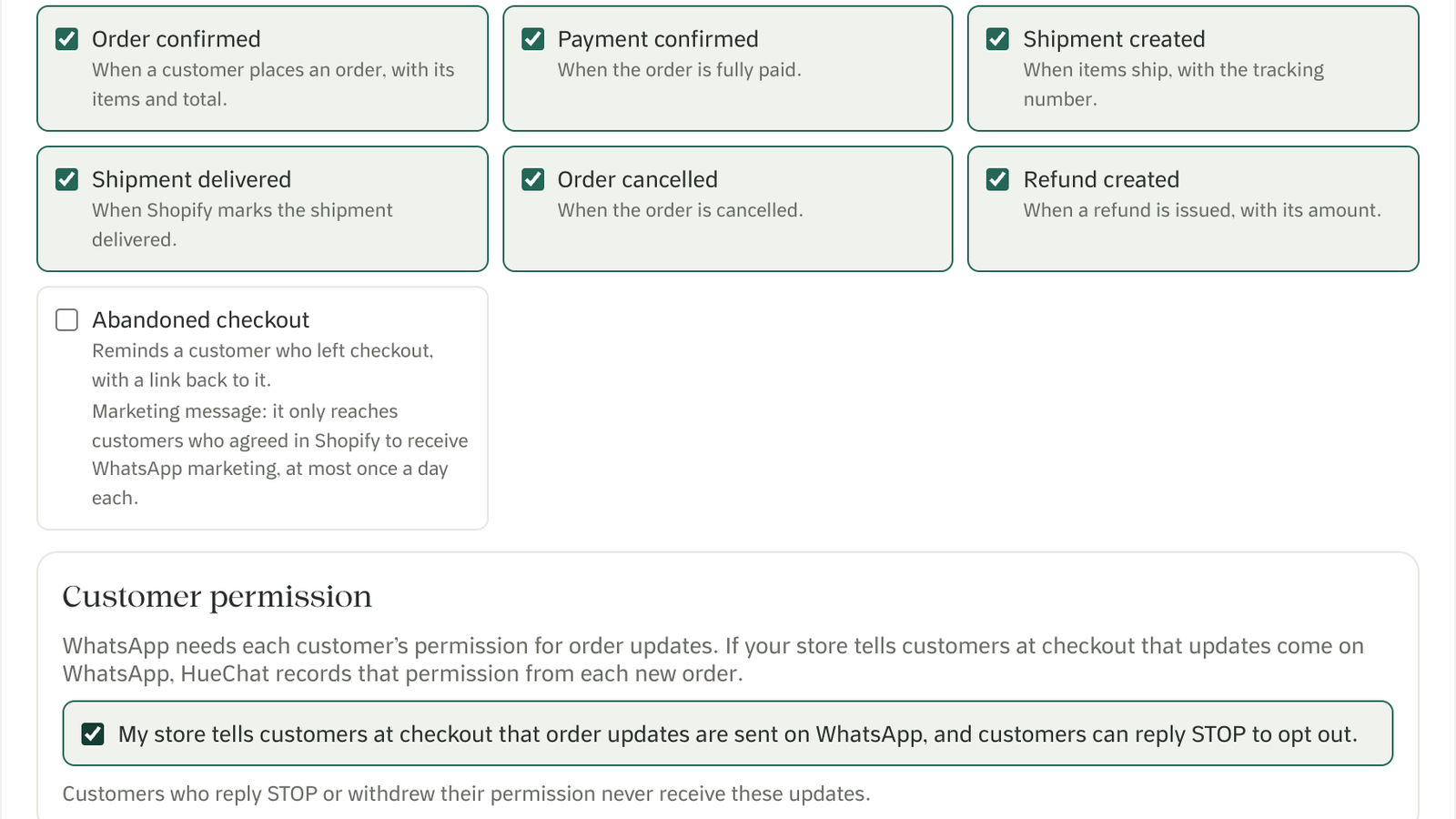
Quick setup step 2: the seven notifications and the customer permission checkbox
¶ Step 3: Templates
HueChat picks a recommended WhatsApp template for each update and fills in the order details from Shopify.
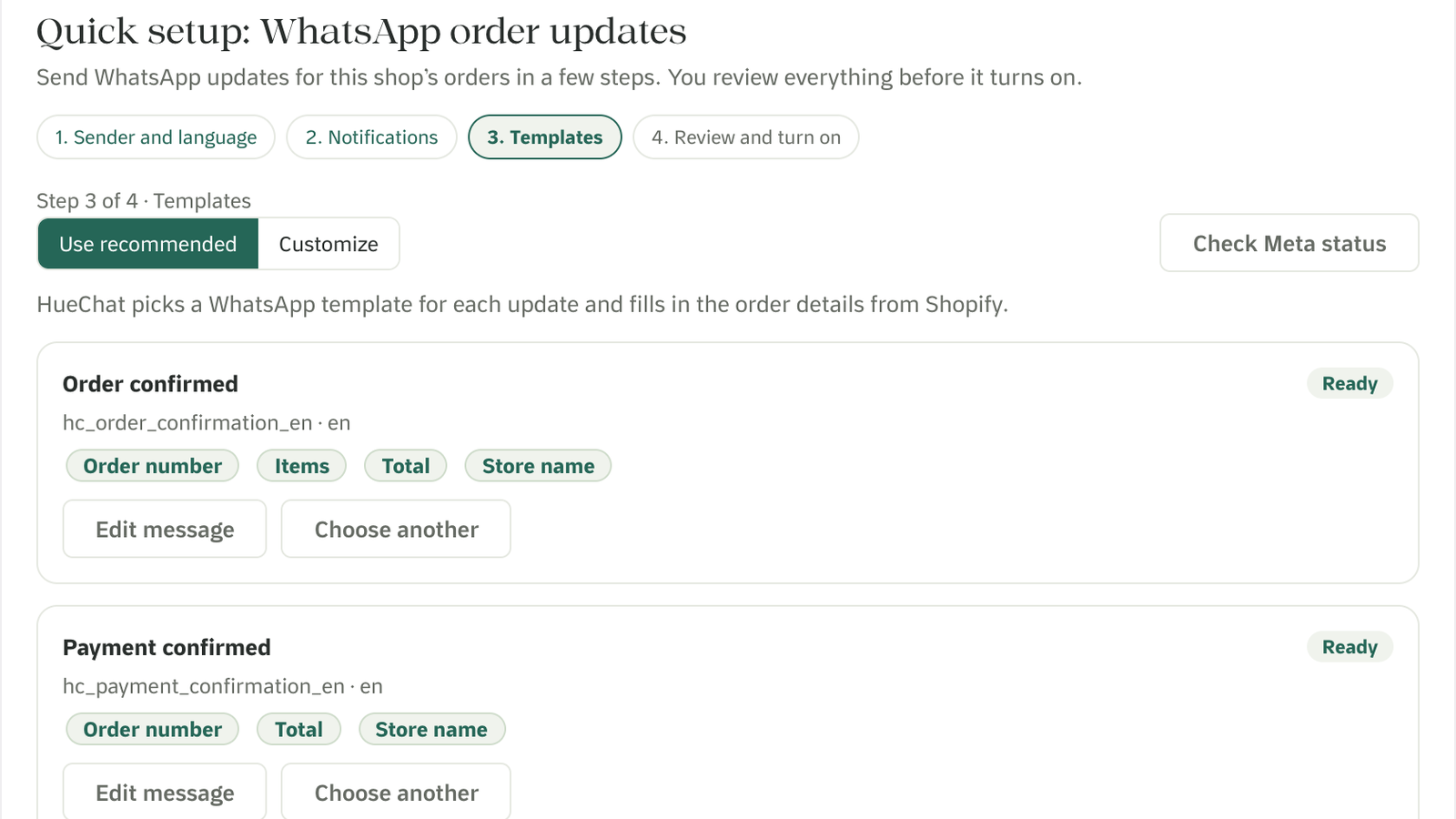
Quick setup step 3: a recommended template for each update, with the order details it fills in
To change the wording, or to add or remove fields, choose Edit message, then Save and send to WhatsApp for approval. The current message keeps sending until WhatsApp approves the new one.
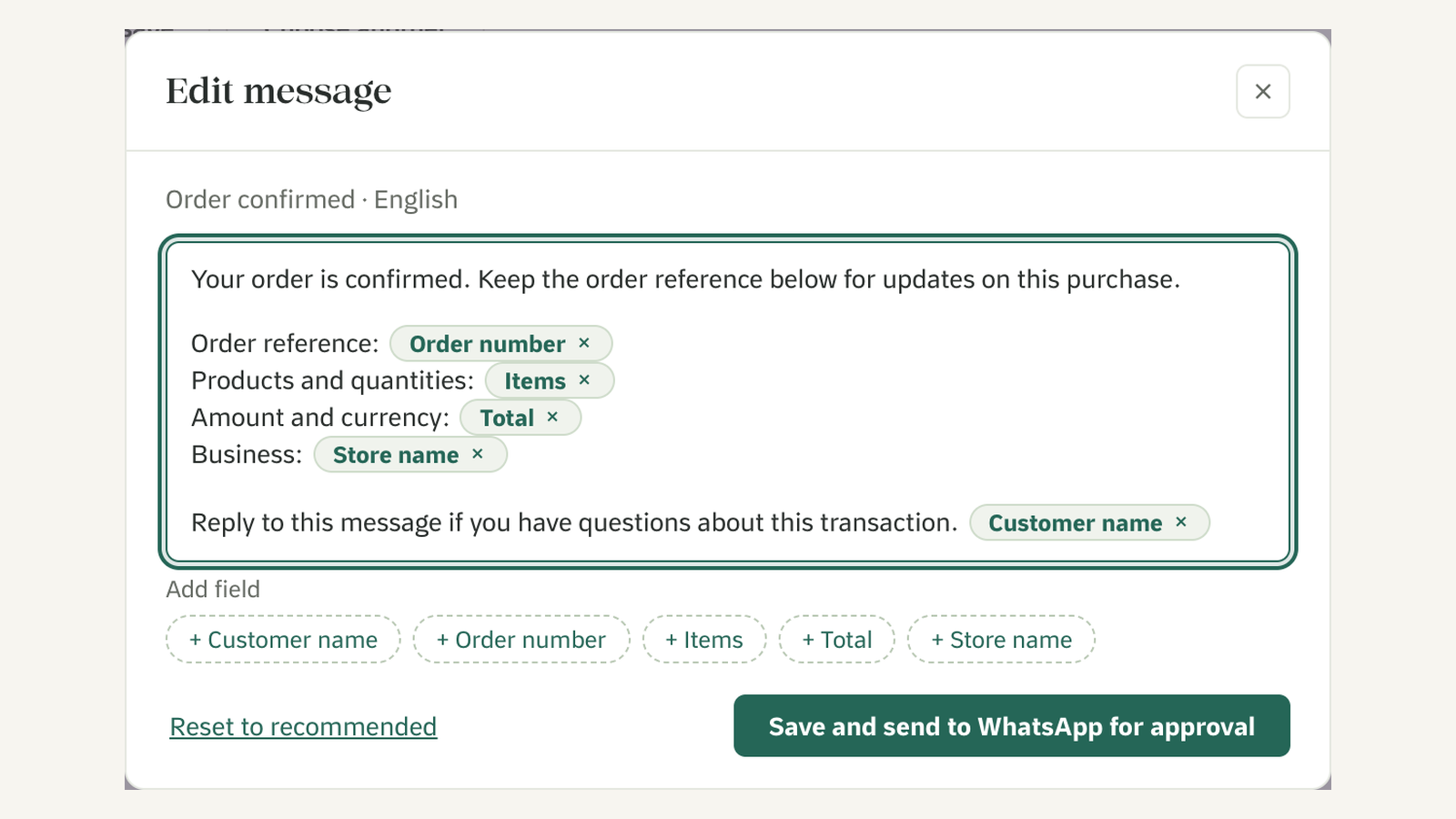
Edit message: change the wording and add or remove order fields
¶ Step 4: Review and turn on
Check the previews, then turn the notifications on. The previews use sample data, and no customer message is sent.
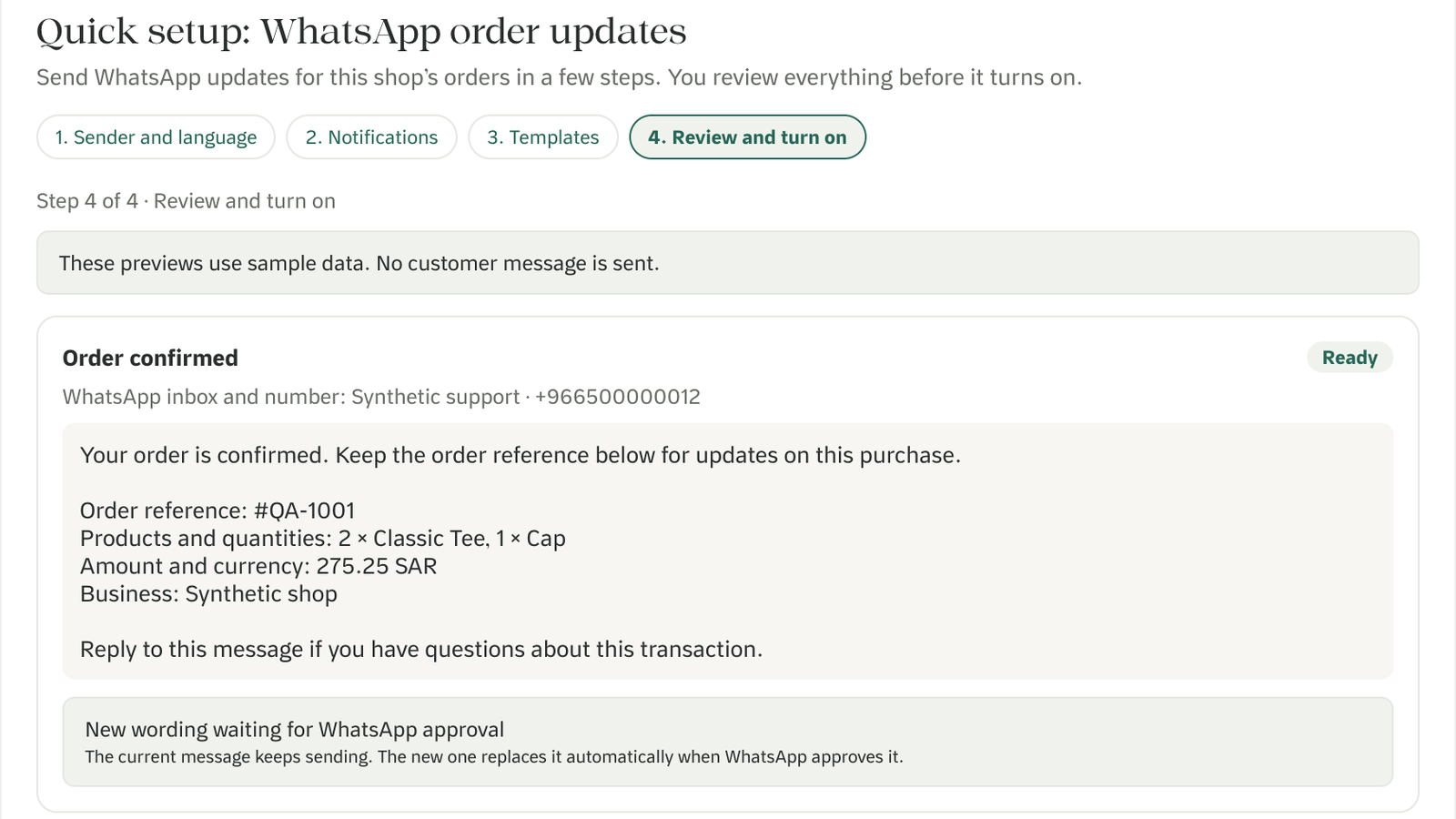
Quick setup step 4: previews with sample data, and new wording waiting for WhatsApp approval
A template that is still waiting for Meta's approval can turn on by itself when Meta approves it.
¶ Customer permission
- WhatsApp needs each customer's permission for order updates.
- In the Notifications step, you confirm that your checkout tells customers order updates are sent on WhatsApp, and that customers can reply STOP to opt out. HueChat then records permission from each new order.
- Customers who reply STOP, or who withdrew their permission, never receive these updates.
- Abandoned checkout reminders only go to customers whose Shopify profile shows WhatsApp marketing consent. Each customer gets at most one a day, and never earlier than 30 minutes after leaving checkout.
Suggested text you can add to your checkout:
We'll send your order updates on WhatsApp to the phone number you enter. Reply STOP anytime to stop them.
¶ Plans
- Connecting Shopify and importing customers and orders is available on every HueChat plan, including Free.
- Sending WhatsApp order messages needs a paid HueChat plan with WhatsApp templates. See huechat.ai/pricing. On the Free plan, Quick setup tells you this and shows See plans.
- Meta charges WhatsApp message fees to your WhatsApp Business account. See huechat.ai/whatsapp-pricing.
¶ FAQ
¶ Do I need WhatsApp?
Yes. You need a WhatsApp Business number connected in HueChat.
¶ Does HueChat change my store or theme?
No. HueChat only reads customers, orders, fulfillments and products.
¶ Will old orders trigger messages?
No. Importing your existing data never sends a message.
¶ What happens when I uninstall?
HueChat stops all messages at once. It erases your store data when Shopify asks, 48 hours after you uninstall.
¶ Where do customer replies go?
To your HueChat Team Inbox, where your team can answer them.
¶ How do I get help?
Write to support@huechat.ai or visit support.huechat.ai.
¶ Privacy
Read how HueChat handles your store and customer data in the privacy policy at huechat.ai/privacy.