Customers notice two things immediately: whether the agent speaks their language and whether it sounds like your business. This article covers both.
¶ One language per agent
In the agent editor, under Configuration, the Language dropdown sets the single language the agent replies in. The hint in the editor explains why: one language per agent prevents language mixing and reduces hallucination.
Supported languages include Arabic, English, Spanish, French, Turkish, Urdu, Hindi, Chinese, Korean, Japanese, Portuguese, German, Italian, Russian, Indonesian, Malay, Filipino, Thai, Vietnamese, Persian, Dutch, Polish and Swahili.
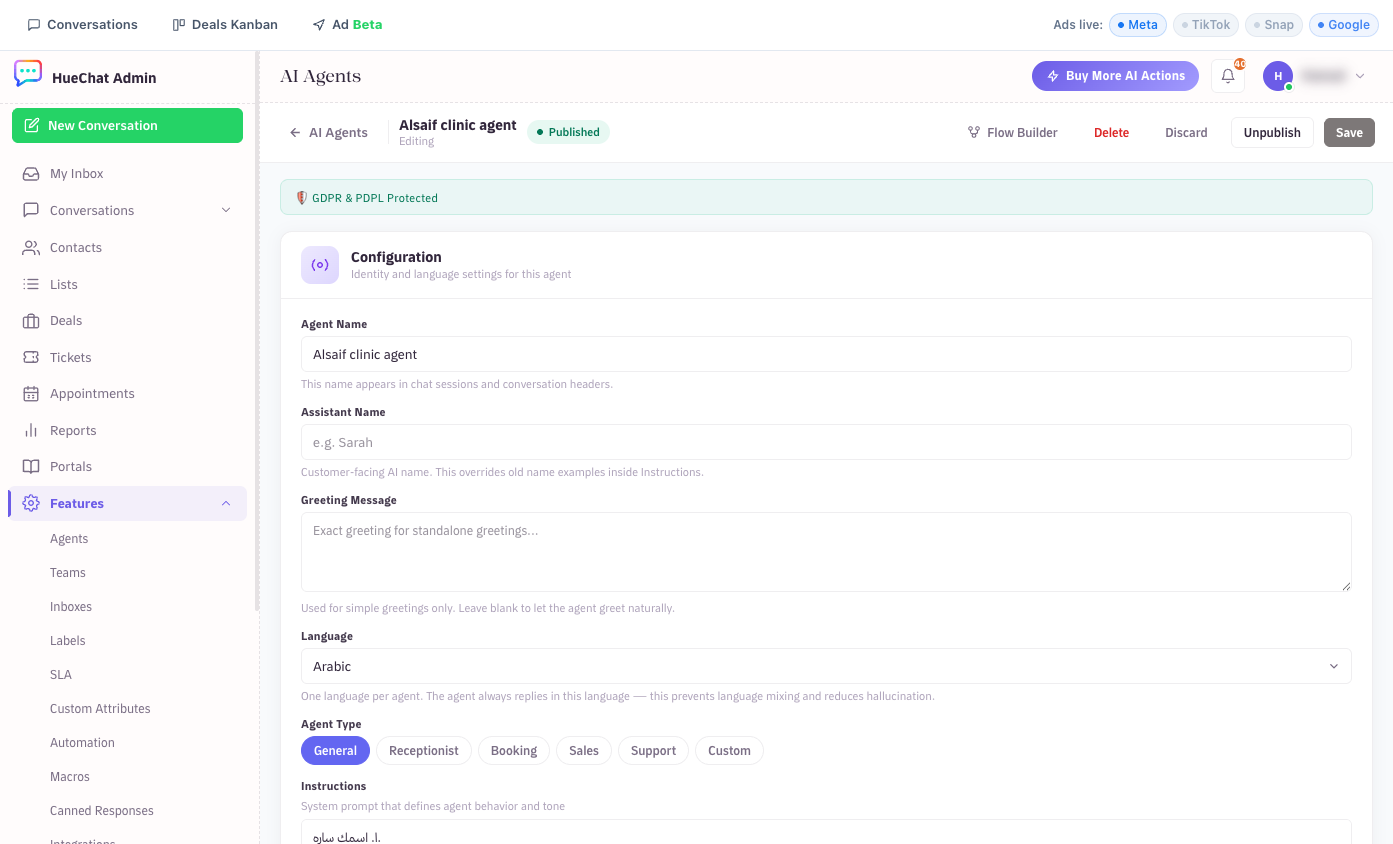
Language and identity settings in the agent editor
¶ Serving Arabic and English customers
Create two agents, for example "Reception (AR)" and "Reception (EN)":
- Duplicate the setup: same Instructions translated, same knowledge sources shared with Account shared or Selected agents visibility.
- Assign each agent to the inbox where that language is expected, for example a separate WhatsApp number or Live Chat widget per language.
- If both languages arrive on one number, choose the language most of your customers use and write in the Instructions how to respond to the other ("If the customer writes in English, answer briefly in English and offer the English line").
Knowledge sources can be in either language. Add Canonical labels in both, such as Laser hair removal, ليزر, so an Arabic question finds an English document and the other way round.
¶ Setting the tone
There is no separate tone switch. Tone lives in the Instructions, which HueChat treats as the primary directive for behaviour. Be concrete:
- "Tone: friendly and professional. Short sentences. No emojis."
- "Address the customer with respect. Use formal Arabic, not dialect."
- "Never apologise more than once per conversation."
- "When you do not know, say so and offer to connect the customer with the team."
Starter templates already include a tone line you can edit. If the agent ignores a rule, make it more specific and move it higher in the Instructions.
Two settings adjust tone automatically:
- Frustration Detection (under Quality & Feedback) detects angry or frustrated customers and adjusts the AI tone.
- Assistant Name is the customer-facing name. Set it here rather than only in the Instructions so the agent introduces itself correctly.
¶ Voice replies
Under Voice Replies you can let the AI answer with a voice message when the customer sends one. Choose a voice from the Arabic set (Saudi male and female voices) or the English set, and a speed. Exact options may differ by plan.
¶ The dashboard language is separate
The Language setting affects customer replies only. The HueChat dashboard itself is available in eight interface languages, with full right-to-left Arabic, chosen in your profile settings. Platform messages such as surveys follow the customer's language.