This article shows you how to create a scoped API key for an integration, and how to keep it safe. API access and webhooks are included from the Growth plan. Only account administrators can create, change or revoke keys.
¶ Two kinds of credential
- Personal access token. Found in your profile settings. It acts as you, with your full role, and never expires. Use it for exploring the API, not for production integrations.
- Scoped API key. Created by an administrator for one integration. It starts with
hc_, acts as the account, and carries only the scopes you grant, plus its own rate limit, an optional IP allowlist and an optional expiry date.
Both are sent in the same header: Authorization: Bearer <token>.
¶ Create a key in HueChat
- Sign in as an administrator or the account owner. Open the menu under your name at the top right, choose Profile, then the Developer API tab.
- Check the capacity cards: API access, history import, account requests per minute, the 10-second burst, active keys (up to 10) and monthly usage. Plan ceilings are set by HueChat.
- Choose Create API key and give it a name that says what it is for, for example "CRM sync".
- Pick the scopes the integration needs and nothing more. A read-only sync needs only
contacts:read,conversations:readandmessages:read. - Optional: set a rate limit in requests per minute (1 to 100,000; the default is 1,000).
- Optional: add the IP addresses or CIDR ranges of your servers to the allowlist. Requests from any other address are refused.
- Optional: set an expiry date. Expired keys stop working automatically.
- Save, then copy the full key immediately. HueChat shows it once ("Copy this secret now. HueChat will not show it again."). Afterwards it only shows the prefix.
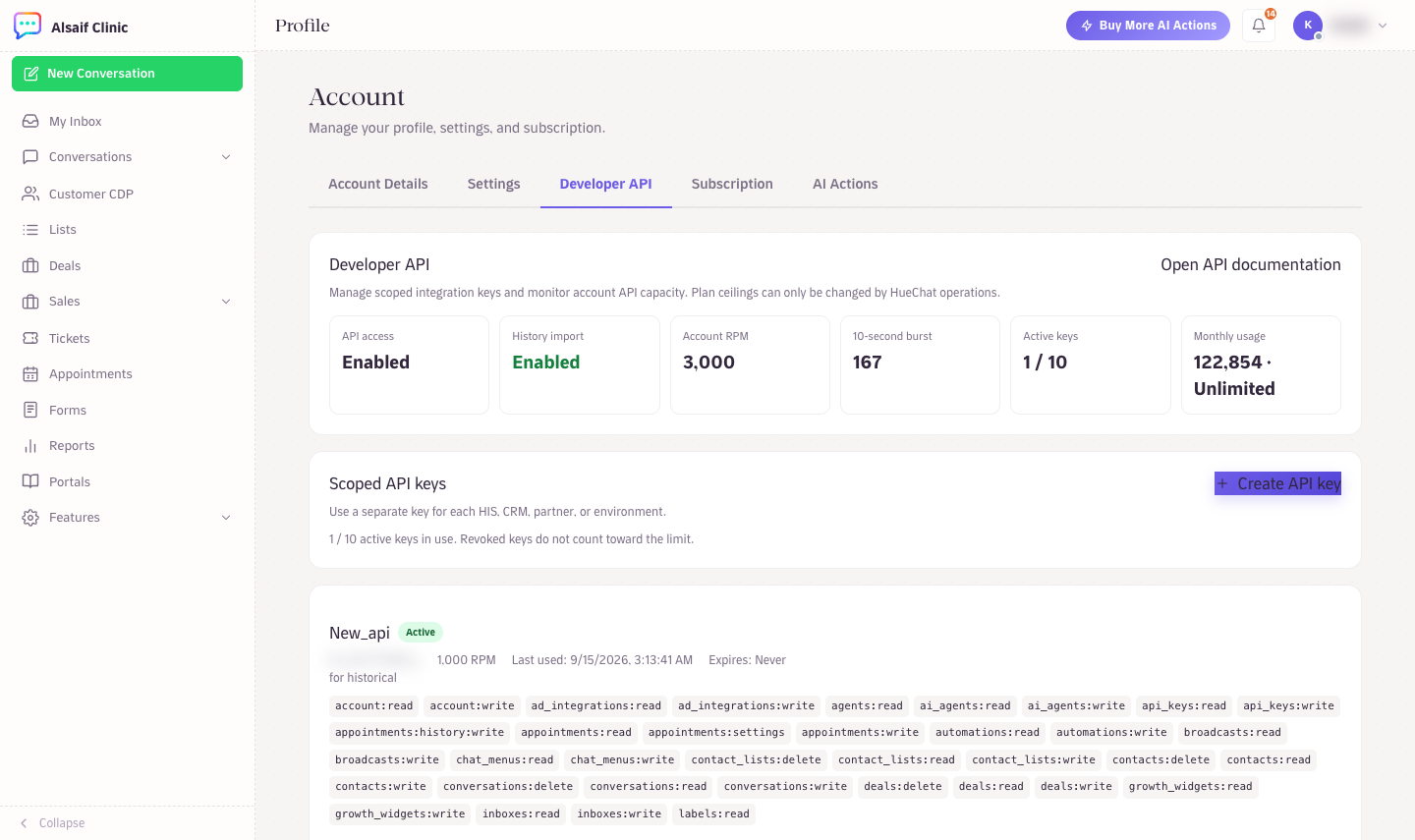
Profile, Developer API: capacity cards and scoped API keys
If you prefer to script it, the same key can be created with POST /api/v2/accounts/{account_id}/api-keys using your personal token. The full request and the complete scope table are in the Developer Hub at https://developers.huechat.ai.
¶ Scopes
Scopes come in read and write pairs for conversations, messages, contacts, inboxes, teams, AI Agents, Broadcasts, webhooks, labels and automations, plus reports:read and account:read. The picker lists every scope your account can grant, including newer ones for templates, workflows, Tickets, deals, leads, Forms and Appointments (appointments:read, appointments:write, appointments:settings and appointments:history:write for importing past appointments). A key that lacks a scope receives a 403 with the message "API key scope is not authorized for this route".
¶ Manage keys later
From the same Developer API page (or the matching API calls) you can use Usage, Edit, Rotate and Revoke on each key:
- Update scopes, rate limit, IP allowlist or expiry.
- Rotate the key. You get a new secret for the same key id, so you can swap it in your integration without touching scopes.
- Revoke the key. It stops working immediately.
- View usage to see when and from where the key was used.
Every create, change, rotate and revoke is written to the API key audit log.
¶ Keep it safe
Store keys in an environment variable or a secrets manager, never in browser code or a public repository. Use one key per integration so you can revoke exactly one thing when a partner is retired. If a key leaks, rotate or revoke it at once. Keys are stored only as hashes, so HueChat cannot show you a lost key.